Introduction

Display Recently Purchased Products for WooCommerce. Plugin supports Widget and Shortcodes to display recently purchased products.

Features

  • Shortcode with list, grid and slider options.
  • Widget to display lists in sidebar.
  • Define how many products you want to display.

Plugin Installation

  • Installing the plugin is similar to installing any other WordPress plugin. Start by logging into your WordPress site and navigating to Plugins > Add New.
  • On the Install Plugins page, click on the Upload option in the top navigation, and then select Browse.
  • Locate the downloaded plugin zip file on your computer and upload it. Remember to unzip the file first to access the plugin zip file.
  • Click on Install Now.
  • Wait for WordPress to finish uploading the file. Once done, click on Activate Plugin.
  • You should now see a message at the top of the window indicating that the plugin has been activated.

How to use the Shortcode?

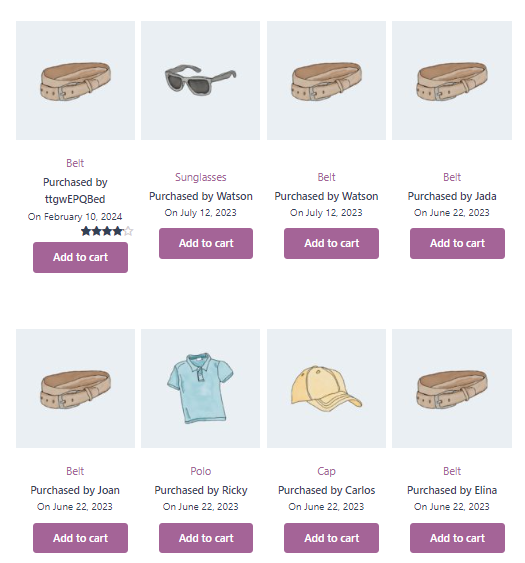
You can use the shortcode to display a list and grid view of recently purchased products. You can find the example for recently purchased “Shortcode Grid” view:


Below are the shortcode supported options:

  • title: Display the title on top of listing. Default is empty.
  • limit: Used to limit the number of products. Default is 5.
  • order: Order of listing either ASC or DESC. Default is DESC.
  • img: Show or hide the product image in listing. Default is Show.
  • img_size: Specify image size 50 if you want 50×50 image Default is 100.
  • img_type: Image type like product image / customer avatar image, Option are product and avatar, Default is product.
  • date: Show or hide product date. Default is Show.
  • price: Show or hide the product price. Default is Show.
  • category: Show or hide the product category. .
  • cart: Show or hide the Add to cart button. Default is Hide.
  • rating: Show or hide the Product rating. Default is Hide.
  • view: Define the view layout. Option are grid and list. Default is list.
  • grid_cols: Number of grid columns will show, if grid view is set Default is 4.
  • customer_info: Show customer information with the recent product, Default is show and it will display Full Name, ‘first_name’ is for First Name, ‘last_name’ is for Last Name.

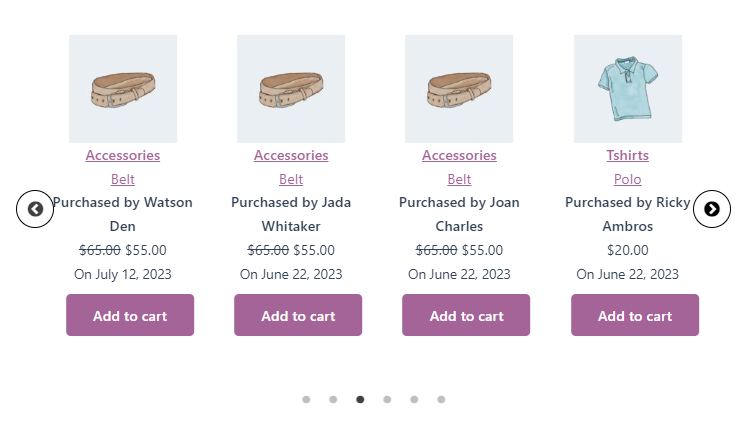
You can find the example for recently purchased “Widget Slider” view:

Purchased by Talha
Original price was: $20.00.Current price is: $18.00.
On May 26, 2025
Purchased by ttgwEPQBed
Original price was: $65.00.Current price is: $55.00.
On February 10, 2024

Purchased by Watson
$90.00
On July 12, 2023
Purchased by Watson
Original price was: $65.00.Current price is: $55.00.
On July 12, 2023
Purchased by Jada
Original price was: $65.00.Current price is: $55.00.
On June 22, 2023
Purchased by Joan
Original price was: $65.00.Current price is: $55.00.
On June 22, 2023


Below are the shortcode supported options:

  • title: Display the title on top of Slider. Default is empty.
  • limit: Used to limit the number of products. Default is 5.
  • category: Show or hide the product category. Default is Show.
  • cart: Show or hide the Add to cart button. Default is Hide.
  • rating: Show or hide the Product rating. Default is Hide.
  • order: Order of listing either ASC or DESC. Default is DESC.
  • img: Show or hide the product image in Slider. Default is Show.
  • img: Show or hide the product image in Slider. Default is Show.
  • img_type: Image type like product image / customer avatar image, Option are product and avatar, Default is product.
  • customer_info: Show customer information with the recent product, Default is show and it will display Full Name, ‘first_name’ is for First Name, ‘last_name’ is for Last Name.
  • date: Show or hide product date. Default is Show.
  • price: Show or hide the product price. Default is Show.
  • slidestoshow: Show number of slide visible. Default is 1.
  • slidestoscroll: Number of slide scroll on next/prev slide. Default is 1.
  • autoplay: Autoplay slider. Option are true and false Default is true.
  • dots: Show dots for the slider, Option are true and false, Default is true.
  • arrow: Show arrow for the next and previous slide. Option are true and false, Default is true.
  • infinite: Scroll infinite loop for the slider. Option are true and false, Default is true.

Widget: Recently Purchased Products For WooCommerce

You can use the widget to display a list, grid, and slider view of recently purchased products.

You can find the example for recently purchased “Widget Grid” view:

You can add widget by WordPress Widget option OR Elementor option.

Add WordPress Widget:


Add Widget in Elementor:


You can find the example for recently purchased “Widget Grid” view:


You can find the example for recently purchased “Widget Slider ” view:


Below are the Widget supported options:

    • Title: Display the title on top of Widget.
    • Image: Show or hide the product image in Widget.
    • Image Size: Specify image size 50 if you want 50×50 image.
    • Image Type: Image type like product image / customer avatar image, Default is product.
    • Number of products to show: Used to limit the number of products.
    • Date: Show or hide product date. Default is Show.
    • Price: Show or hide the product price. Default is Show.
    • Category: Show or hide the product category. Default is Show.
    • Product Rating: Show or hide the Product rating.
    • Order: Order of listing either ASC or DESC. Default is DESC.
    • Add to Cart Button: Show or hide the Add to cart button.
    • Customer Info: Show customer information with the recent product, Default is show and it will display Full Name, ‘first_name’ is for First Name, ‘last_name’ is for Last Name.
    • Show in Slider: Show or hide the Widget as Slider.
    • Slider Dots: Show dots for the slider.
    • Slider Arrow: Show arrow for the next and previous slide.
    • Auto Play: Show Slider as Autoplay slider.
    • Slider Infinite: Scroll infinite loop for the slider. Default is true.

Have a look at the demo

You can view a demo from here: Recently Purchased Products For Woo

Check this out YouTube demo video:

Need Support?
Last update date: July 18, 2024
By: World Web Technology
Email: help.worldweb@gmail.com
If you have any question which you couldn’t get answered within our documentation then feel free to email us on help.worldweb@gmail.com.Thank you.
Scroll to Top